A common private-cloud goal sounds like this:
Run the media server as multiple microservices in Kubernetes. Route external traffic through a TURN server that acts as a media gateway. Run recording as its own microservice so it can scale independently.
That direction is right. A few precise corrections make it production-safe.
What to keep — and what to tighten
Keep: mediasoup as an SFU cluster (many worker pods), not one giant process. Recorders as a separate service. Private cloud with a small public surface.
Tighten:
- TURN is not the media server. It is a relay (STUN/TURN). In this pattern it is a media gateway: clients send RTP to TURN; TURN forwards to SFU pods that stay off the public internet. The SFU still does forwarding, simulcast, and bandwidth estimation.
- Do not send signaling through TURN. Offers, answers, ICE, room APIs, and auth go HTTPS / WSS via Ingress (or an API gateway). Mixing control and media on one port makes debugging and certificates painful.
- You cannot round-robin RTP across pods. A mediasoup
Router(and itsTransports) live on one Worker. A room must be sticky to a worker (or a pair of workers if you pipe between them). Kubernetes Service load-balancing is for HTTP, not for live RTP sessions. - “Multiple microservices” should mean split by axis, not a copy of the same binary. Typical split: signaling, room director, SFU worker, TURN, recorder, storage.
Target architecture
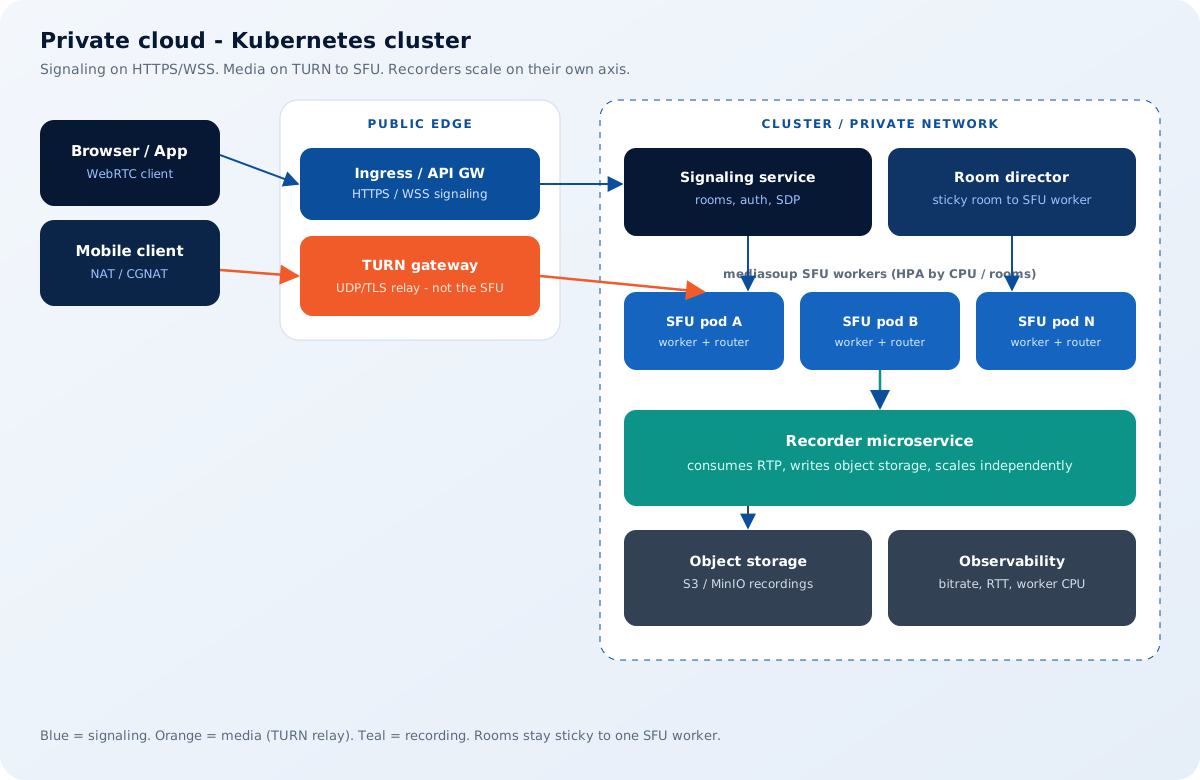
Outside the cluster (public / DMZ)
- Ingress — TLS for signaling (
wss://meet.example.com). - TURN gateway (often coturn, dedicated nodes or a small DaemonSet with
hostNetwork) — UDP 3478 and/or TURN-over-TLS 5349. This is the only place browsers send media if you force relay (or if ICE never finds a direct path).
Inside the cluster (ClusterIP / private CNI)
- Signaling service — rooms, tokens, SDP. Horizontally scalable and mostly stateless (session state in Redis if needed).
- Room director — maps
roomId → sfuPod. This is the piece people skip and then wonder why every other join is silent. - mediasoup SFU workers — one Worker per CPU is still the healthy default. Each pod owns a set of rooms.
- Recorder workers — consume from the SFU (pipe / RTP / “bot” consumer), mux, upload. HPA on recording jobs, not on SFU CPU.
- Object storage — S3-compatible for VOD.
Why TURN-as-gateway fits private Kubernetes
Kubernetes is excellent at HTTP. It is awkward at many UDP flows with session affinity.
If every SFU pod advertised public host candidates (hostNetwork, NodePorts, MetalLB per pod), you would fight:
- CNI vs host UDP
- source IP preservation
- firewall holes per node
- ICE candidate churn on pod restart
A cleaner private-cloud contract:
- SFUs never have a public IP.
- Clients use relay candidates only (or ICE that almost always lands on TURN).
- TURN has a stable public address and a static UDP/TLS port range you can document for bank firewalls.
- TURN talks to SFUs on the cluster network (or a dedicated media VLAN).
That is “TURN as media gateway.” It adds a hop (latency + TURN CPU + egress). For regulated private cloud, that hop is often cheaper than exposing every worker.
If you can expose UDP safely (bare metal, dedicated media nodes, well-tuned CNI), direct ICE to the SFU is lower latency. Use TURN-as-gateway when policy or Kubernetes networking says “no public RTP.”
Sticky rooms: the rule that makes scale work
join(roomId)
  → director: which SFU owns this room?
  → if none: pick least-loaded worker, persist mapping
  → signaling talks only to that worker’s control API
  → client ICE → TURN → that same worker’s transports
If the mapping is lost, everyone in the room must reconnect (or you drain with PipeTransport to a new worker — advanced). Treat room placement as state, with a TTL longer than the meeting.
Scale SFU pods with HPA on worker CPU / rooms per pod, then stop placing new rooms on hot workers. Do not put two busy 50-person rooms on the same 1-vCPU worker.
Recording as its own microservice
Do not encode MP4 inside the SFU process. That couples live forwarding CPU with ffmpeg/GStreamer.
Pattern that scales independently:
- Signaling starts
record(roomId). - Director tells the recorder pool (queue: NATS / Redis / K8s Job).
- A recorder pod attaches to the room’s SFU (
PipeTransport, RTP, or a privileged consumer). - Recorder writes fragments to disk/object storage; SFU stays in the forwarding path.
- HPA scales recorders on active recordings / queue depth.
Composed “one file, grid view” recordings are MCU-like and need more CPU/GPU. Plain per-track dumps are cheaper and can be composed later.
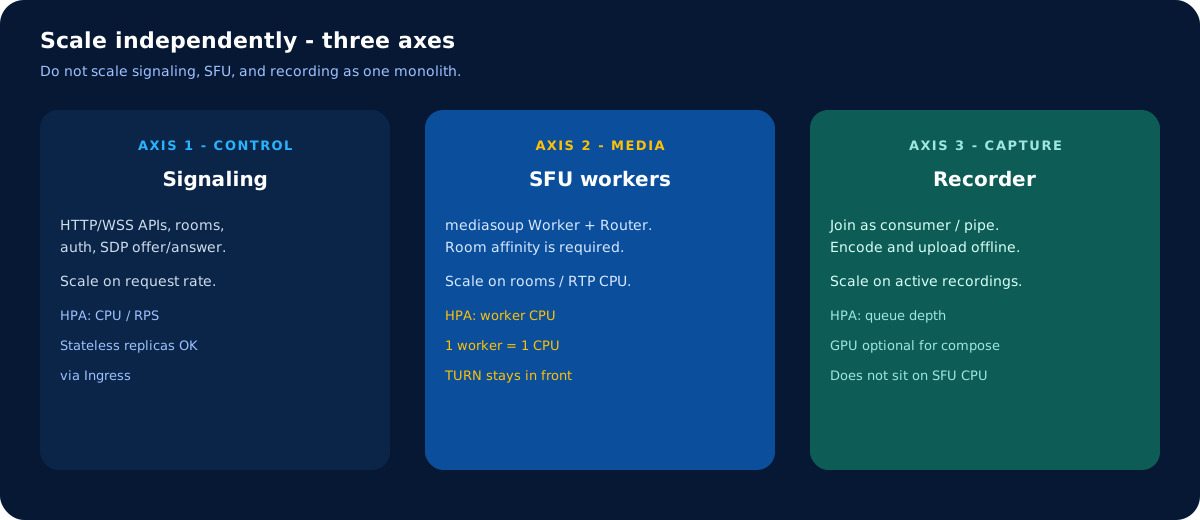
Suggested Kubernetes split
| Workload | Public? | Scale on | Notes |
|---|---|---|---|
| Ingress / API | Yes | RPS | Signaling only |
| TURN | Yes (UDP/TLS) | Relay sessions / bandwidth | Dedicated nodes if possible |
| Signaling | No | RPS | Stateless |
| Room director | No | Rooms | Needs a data store |
| mediasoup worker | No | CPU, rooms | Sticky; 1 worker ≈ 1 CPU |
| Recorder | No | Active jobs | Independent HPA |
| Redis / NATS | No | — | Room map + job queue |
Operational checklist
- ICE policy:
relayfor locked-down tenants;allonly if SFUs can be reached. - TURN credentials: time-limited (REST / ephemeral), never a shared password in the client.
- Pod disruption: drain rooms before killing an SFU pod (
PreStop, PodDisruptionBudget). - NetworkPolicy: clients ↛ SFU; TURN → SFU UDP; recorder → SFU; everyone else deny.
- Metrics: worker CPU, transport count, TURN allocations, recorder lag, join ICE time.
- Load tests: last-mile loss and TURN saturation — not only happy-path LAN.
How this maps to LiveideX
LiveideX Meet and Stream are built around the same production split: control plane, media workers, edge relay, recording off to the side. If you are designing this in-house, start with room stickiness and TURN capacity — those two decide whether Kubernetes helps or hurts.
Need a topology review for your cluster? WebRTC & cloud consulting or nithin@liveidex.com.